Instagram Reels Download
Save your favorite Instagram Reels in crystal-clear HD — fast and free
MovSave is a fast and intuitive web tool designed to help you save Instagram Reels directly to your mobile phone, tablet, or desktop in top video quality. Enjoy entertaining clips, viral trends, and creative videos offline anytime without intrusive watermarks or quality drop.
Here's a quick and easy way to do it:
Steps to Download Reels From Instagram
Step:1 Browse Instagram and locate the Reels clip you wish to save.
Step:2 Tap the share icon or the three dots menu and copy the video URL.
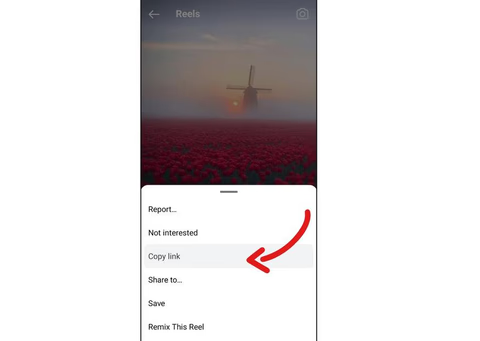
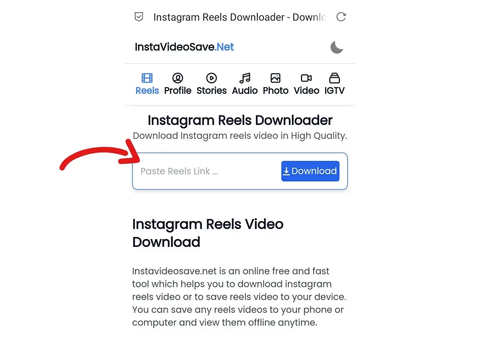
Step:3 Open your browser and navigate to "https://movsave.com".
Step:4 Paste the copied link into the input field above.
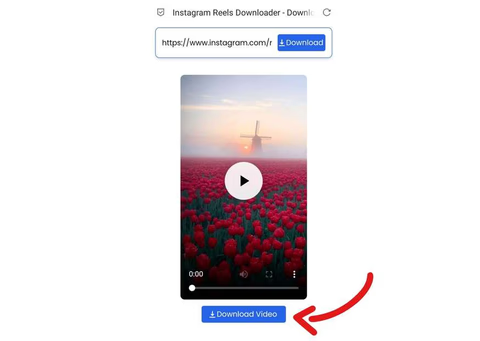
Step:5 Click "Download Video" to fetch your MP4 file and store it on your device.
How Instagram Downloader Works?
Our Instagram Reels Downloader extracts media directly from the public source link. By fetching the original video stream hosted on Instagram servers, MovSave delivers the unmodified MP4 file straight to your local storage without re-encoding or adding logos.
Key features:- Crisp Full HD Quality: Retrieve videos in their original clarity without watermarks or compression artifacts.
- Universal Device Support: Fully compatible with iOS, Android, macOS, Windows, and Linux browsers.
- No App Installation Needed: 100% web-based utility—no risky APK files, extensions, or setup required.
- Unlimited & Free: Save as many reels as you want every day without unexpected fees or subscription tiers.
Your security and privacy come first. MovSave never requires account logins, passwords, or personal details. The download process is completely anonymous, safe, and available around the clock.
Why? Movsave.com
MovSave was built for lightning-fast performance and clean usability. While other downloaders clutter the screen with intrusive popups and complicated steps, MovSave processes video links in seconds so you can save reels with a single tap.
How to download reels video online from Instagram?
Because the official Instagram app does not provide a direct button to save reels to your device gallery with sound, MovSave bridges the gap. Simply paste the link, choose your preferred format, and enjoy instant offline access.
Note: We encourage respectful usage of creator content. Please download videos only for personal entertainment and reference, and always credit original owners or seek permission before reposting.
DMCA: MovSave respects intellectual property rights and complies with 17 U.S.C. § 512 and the Digital Millennium Copyright Act (DMCA). If you believe your copyrighted work is accessible through this site in an unauthorized manner, please reach out to us for prompt removal.